v1.1.3 Tasks interface

Version 1.1.3 internal test release
- progress on scope documentation, which is mostly complete and released as v1.0
- inital clickable demo on the Tasks interface
- starter for discussion on how some of the parts need to work with each other
Tasks interface
This is a pseudo-live clickable demo, the code equivalent of wireframes, which serves as a design exploration, decision tree, and technology test all-on-one. From the placment list this outlines the behaviour after a students selects Tasks.
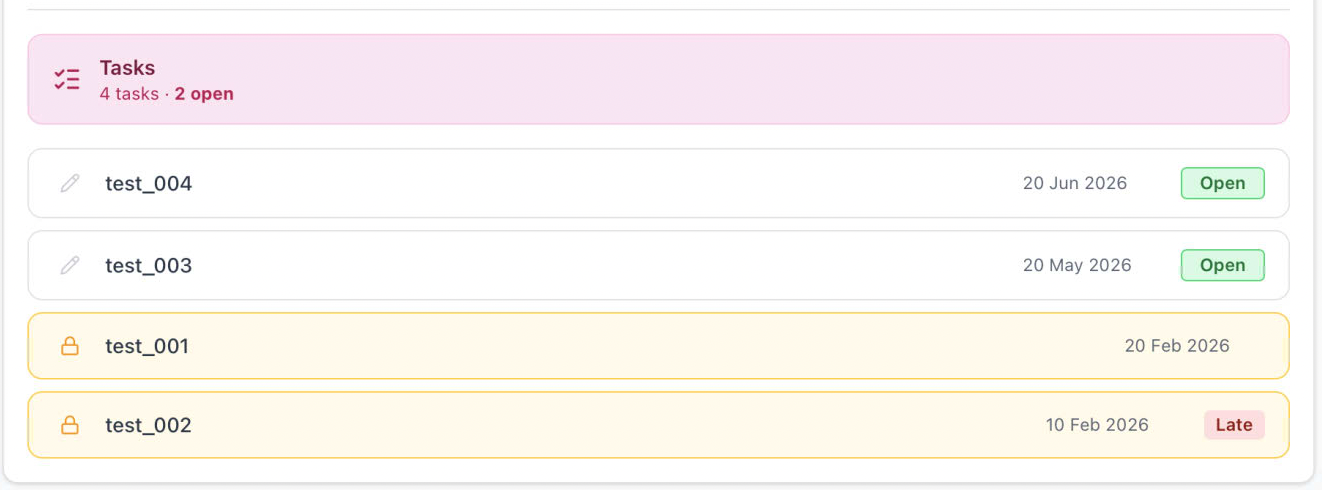
A list of Tasks is presented, with indicators for deadline date, late, and locked. If a user selects a task row, it replaces the placement list with the survey view in place — no page navigation, top navigation stays but back nav button changes label and action. If there is an stored data returned from the query initiated on clicking the row, client code always injects authoritative values for these fields, overriding anything in locally stored data.
The student enters data or selects form a presented choice, and at the footer are three buttons. Save will perform and explicit commit of data (back to FileMaker). Clear will remove all current values from form. Submit will show dialog confirming action, and then both save data and add the finalCommit value. For students, all buttons are hidden when isLocked === true.

Autosave
The Student + open state only — record is debounced at 1500ms after last keystroke to trigger autosave. No autosave for supervisor, marker, or any finalised record. (autocheck needs to only be triggered if there is data, so after clear, it will not overwrite savedData ??)
SurveyJson Hidden Fields
studentID,moduleID,superIDremain as hidden questions inside the surveyJson- This preserves the FileMaker Creator approval workflow — question authors can test conditions without code
Because this is a combination of React and SurveyJS, there are behaviours that can be driven from the client as well as the JSON definition. They work at different levels: SurveyJS JSON conditions handle question-level behaviour, React/client code handles the survey-level behaviour in TaskClient.tsx - this the important one for the locked/finalised case (this needs to be always for external, and for student if locked) — which puts the entire SurveyJS instance into a read-only display mode regardless of any individual question conditions. No inputs are rendered, everything becomes plain text.
if (isStudent && task.state !== "locked" || isExternal) {
  survey.mode = "display";
}
The desired behaviour for supervisor and marker requirements need finalising, and a decision about visibility to students of supervisor and/or marker comments.
A TEMPLATE Task is created, with one of each role of question and notes about visibility conditions. Creators start from there and duplicate questions as required, which keeps the settings & conditions. This is easy because you can simply change th question type from the drop-down.
Question Naming Conventions
| Prefix | Who | Behaviour |
|---|---|---|
Q1, Q2 etc | Student questions | enableIf: "{superID} empty" |
SQ1, SQ2 etc | Supervisor questions | enableIf: "markerID} empty", visibleIf: "{superID} notempty" |
MQ1, MQ2 etc | Marker questions | visibleIf: "{markerID} notempty" |
studentID, moduleID, superID, markerID | Hidden carriers | Always injected by client |