Ugrás a fő tartalomhoz

17 bejegyzés a(z) "Test" címkével

Test releases and pre-release builds.

Összes címke megtekintése

v1.1.6

· 4 perc olvasás
John Renfrew
Programmer and data architect

Version 1.1.6 internal test release

  • Testing video upload and precessing

Following from conversation about StudentTasks, a technology test was completed to uncover issues and benefits in the requirement to allow video uploads, with later playback (markers and external). In the same way as documents, this needs to allow the re-submission of a file until the task is 'locked'.

Because the upload can be a long running process, then upload status needs to be visible while it is happening, and then encoding to straming formats takes place service-side, and so there is a requirement for the UI to show the stages of progress up to the point of completion. From that point, with the record in locked state the UI would show both a thumbnnail of the video, and button elements to view the video using the service player.

At this stage, all testing was done with a small (32sec) video, but later testing needs to work out timings for upload, encoding, and the storage implications of a years worth of full-size video.

After previous investigation conclusions, this test was done with Bunny -https://bunny.net. Their Stream platform is fully API driven and so highly suitable for the purpose. A playbook is written and fully tested.

  • Upload → first creates BunnyStream video object, returns videoId (similar to Inspera)
  • On return the StudentTask record is patched with this into videoID field and status of uploading
  • Upload → then the file is uploaded to that document record, using TUS resumable upload protocol (automaticlly handles interrupted transfers)
  • On status complete, the StudentTaks record is updated to show that processing is processing
  • MetaTags are added to the Stream record, which can be used for search and other API operations
  • Task record videoStatus updated through lifecycle, videoEmbedUrl populated when encoding complete
  • Bunny sends webhooks on progress and these are routed through Claris Connect, so that some actions can eaily update Task record, and also forwarded to the node service

Direct upload to Bunny ensure video bytes never touch our server, we only handle metadata and progress or status information. The player format is simple > https://player.mediadelivery.net/embed/{libraryId}/{videoId}

Investigation was made into using signed links for video retrieval but honestly wasted a lot of time on something which still unable to get to work. The files ar enot publicly exposed and the ony way you can get to view is from inside something where you are logged in, so for the moment parked unless there is deemed a need. The player's default behaviours (autoplay, captions, preload) can be set globally in the BunnyStream library dashboard.

Encoding

Encoding is free on the strndard tier but uses a shared queue. Premium encoding is available for a charge : uses Just-In-Time (JIT) technology — video playable within seconds of upload. Cost at $0.05/minute: estimate of max 1,200 minutes × $0.05 = $60/year maximum. Given that the marker is looking at the task records after they are completed it is unlikley that this would be required.

Testing with a 32-second 64MB MOV file completed end-to-end in under 6 minutes, testing with more realistic file will give better benchmarks. This does affect the ability of the student to view the uploaded and encoded file, discussion needed.

Futher development

A student on a mobile device (e.g. recording placement footage on a phone) could receive an SMS or email containing a link to a minimal, standalone upload page from inside the Digifolio. The link contains enough context to identify the StudentTask record without requiring full portal authentication, to be able to view the video. This would be linked to a one-time or short-lived token.

v1.1.5

· 2 perc olvasás
John Renfrew
Programmer and data architect

Version 1.1.5 internal test release

  • Testing .docx and .pdf text extraction

Following from conversation about StudentTasks, a technology test was completed to create a service to be able to ansyncronously retrieve a base64 encoded document from a FileMaker record. This would be triggered after a submit action finalises a student task submission. There is no UI requirement, so status information becomes key to confirm completion, failure or stalled extractions. Paramters are {taskID, fileType}

{
"text": "extracted plain text content",
"charCount": 17961,
"durationMs": 209,
"library": "mammoth",
"version": "1.8.0",
"filename": "report.docx",
"lineBreaks": "single",
"hash": "c99b32954d120bf62ad818944660275f"
}

This has been extended to provide a micro-service, which can take parameters of type and base64encoded file, along with fileName and returnHash. As this is an open endpoint we shall be adding a state or session parameter to reduce fake attempts.

információ

cURL https://server/extraction/api/extract/direct {"b64": "${B64}", "fileType": "pdf", "fileName": "test4.pdf", "returnHash": true}

{
"text": "extracted text",
"charCount": 2115,
"durationMs": 241,
"library": "mammoth",
"version": "1.12.0",
"filename": "test.docx",
"hash": "c99b32954d120bf62ad818944660275f"
}

Response is very fast at sub 300ms for 4 page test docx file, and this covers:

  • TLS handshake
  • nginx proxy overhead and routing
  • base64 decode
  • mammoth parsing the DOCX XML
  • JSON serialisation of the response
  • network latency both ways

A playbook is written and fully tested.

  • Upload → stores b64 of doc on StudentTask record
  • (may repeat — each upload overwrites previous b64)
  • Commit → OData PATCH (answers + timestamp + locked)
  • → fire-and-forget POST to extraction service
  • POST /api/extract
  • Node Extraction Service (Express)
  1. PATCH StudentTask → extractionStatus: 'processing'
  2. Fetch b64 from StudentTask via OData
  3. Decode → Buffer
  4. Branch: DOCX → mammoth | PDF → pdfjs-dist
  5. Compute MD5 hash of original binary
  6. PATCH StudentTask → extracted text + metadata
  7. POST to FileMaker script → archive b64 to Documents FileMaker StudentTask record — extracted text, status fields Documents record — reconstituted original binary linked to StudentTask

If questions are prefixed with a known character (§) then the text can be extracted with singke carriage returns and then substitute extra lines before teh character for presentation purposes. The extraction is written as a service, so could be called from other places in the FileMaker ecosphere.

v1.1.4 Translation

· Egy perc olvasás
John Renfrew
Programmer and data architect

Version 1.1.4 internal test release

  • Translations tests to docs site
  • Polish (pl)
  • Hungarian (hu)
  • Romanian (ro)
  • Serbian (hr)

Added frameworks and set up for aditional translation support for Supervisor tutotrial pages. Basic supervisor and student docs pages are now in languages.

Decision needed on which Serbo-Croation flavours to support.

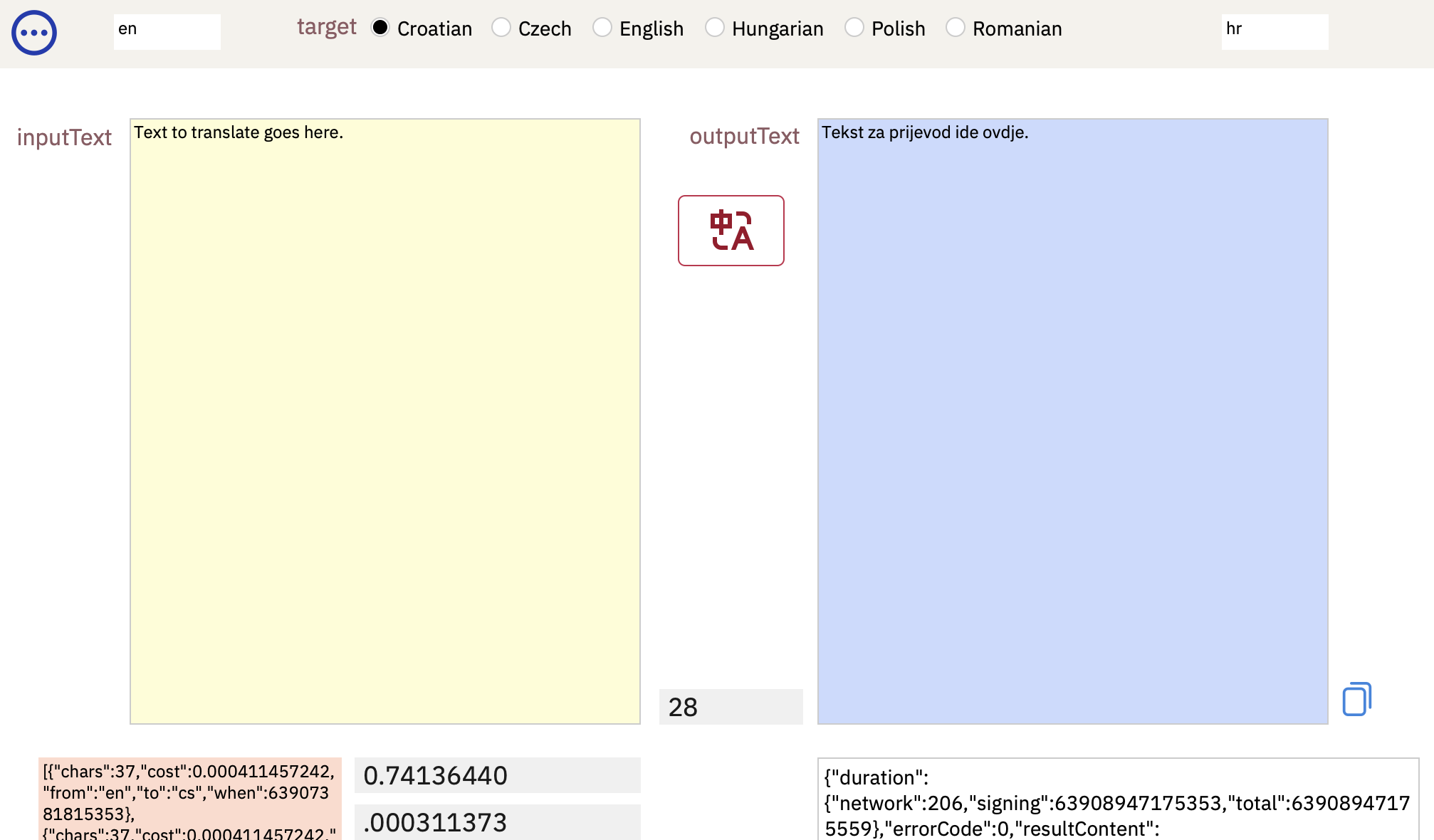
Installed the AWS translation code into Sopley_portfolio on the altdb server, to make it more widely available. Paste the text to be translated into the left field, select the language for the output text, and push the translate button. Once the translation is returned, the copy button will place the output text on the clipboard. You may, of course, copy parts of the output.

There is an indication of the length of the text in the centre, along with an indication of the cost of the action. AWS charges $50 per million characters.

portfolio

v1.1.3 Tasks interface

· 3 perc olvasás
John Renfrew
Programmer and data architect

Version 1.1.3 internal test release

  • progress on scope documentation, which is mostly complete and released as v1.0
  • inital clickable demo on the Tasks interface
  • starter for discussion on how some of the parts need to work with each other

Tasks interface

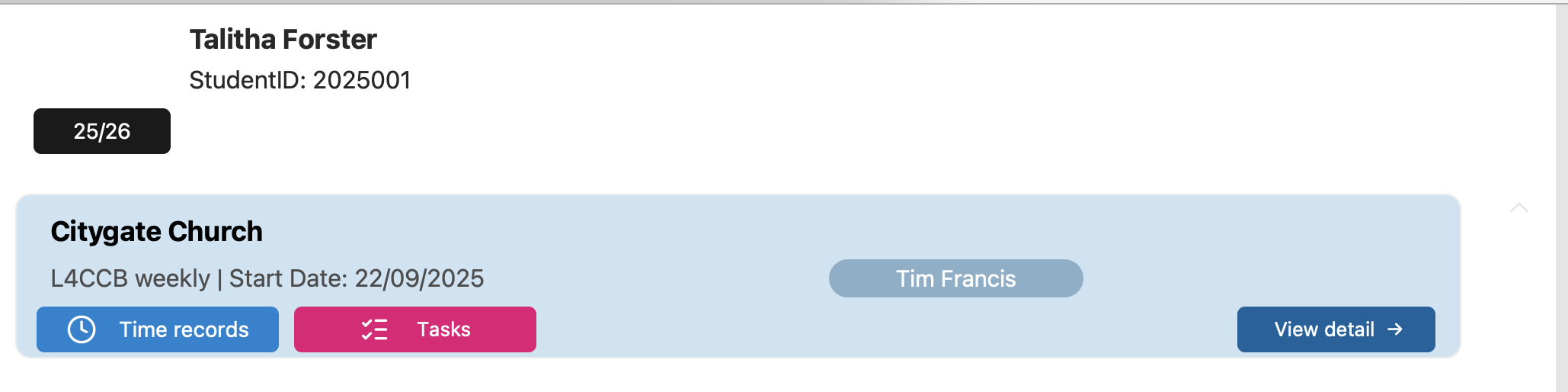
This is a pseudo-live clickable demo, the code equivalent of wireframes, which serves as a design exploration, decision tree, and technology test all-on-one. From the placment list this outlines the behaviour after a students selects Tasks.

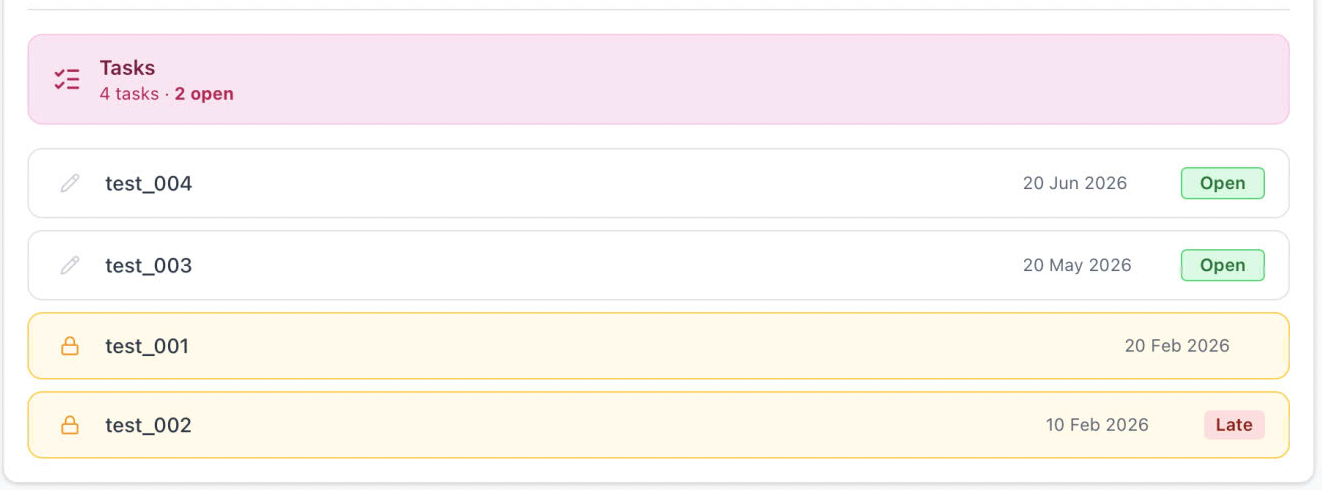
A list of Tasks is presented, with indicators for deadline date, late, and locked. If a user selects a task row, it replaces the placement list with the survey view in place — no page navigation, top navigation stays but back nav button changes label and action. If there is an stored data returned from the query initiated on clicking the row, client code always injects authoritative values for these fields, overriding anything in locally stored data.

portfolio

The student enters data or selects form a presented choice, and at the footer are three buttons. Save will perform and explicit commit of data (back to FileMaker). Clear will remove all current values from form. Submit will show dialog confirming action, and then both save data and add the finalCommit value. For students, all buttons are hidden when isLocked === true.

portfolio

Autosave

The Student + open state only — record is debounced at 1500ms after last keystroke to trigger autosave. No autosave for supervisor, marker, or any finalised record. (autocheck needs to only be triggered if there is data, so after clear, it will not overwrite savedData ??)

SurveyJson Hidden Fields

  • studentID, moduleID, superID remain as hidden questions inside the surveyJson
  • This preserves the FileMaker Creator approval workflow — question authors can test conditions without code

Because this is a combination of React and SurveyJS, there are behaviours that can be driven from the client as well as the JSON definition. They work at different levels: SurveyJS JSON conditions handle question-level behaviour, React/client code handles the survey-level behaviour in TaskClient.tsx - this the important one for the locked/finalised case (this needs to be always for external, and for student if locked) — which puts the entire SurveyJS instance into a read-only display mode regardless of any individual question conditions. No inputs are rendered, everything becomes plain text.

if (isStudent && task.state !== "locked" || isExternal) {
survey.mode = "display";
}

The desired behaviour for supervisor and marker requirements need finalising, and a decision about visibility to students of supervisor and/or marker comments.
A TEMPLATE Task is created, with one of each role of question and notes about visibility conditions. Creators start from there and duplicate questions as required, which keeps the settings & conditions. This is easy because you can simply change th question type from the drop-down.

Question Naming Conventions

PrefixWhoBehaviour
Q1, Q2 etcStudent questionsenableIf: "{superID} empty"
SQ1, SQ2 etcSupervisor questionsenableIf: "markerID} empty", visibleIf: "{superID} notempty"
MQ1, MQ2 etcMarker questionsvisibleIf: "{markerID} notempty"
studentID, moduleID, superID, markerIDHidden carriersAlways injected by client

v1.1.2

· 3 perc olvasás
John Renfrew
Programmer and data architect

Version 1.1.2 internal test release

  • Echo360 API
  • Updated SurveyJS to 2.5.13
  • more

Echo360 has an API, which allows us to manage User accounts (and media). We have tested the API, and have scripts running in FileMaker to query Student users, based on Moorlands Email address. There is also a script to create a user, and Echo then sends them an email invite to the platform. We need to investigate what happens with the MCEE students and time zones on sign-up.

The access token for the API is valid for 1 hour, after which the refresh token can be used to retrieve another, along with a new refresh token. Each refresh token may only be used once, so it there is some failure, the process needs to use the client-credentials workflow as a fallback.

The creation of the Echo360 account could be scripted as part of the initial student comms from Technical Support. With API access, the User accounts could then be removed as part of the end-of year or leaving process.

Echo360 Video

It may be that using the User account to hook to any video uploads is not the right thing to do, as the Student:

  • would have to manually create a sharing link so that it can be pasted
  • has the opportunity to delete the file after upload

Next investigations will cover the mechanics of uploads through the DigiFolio, but sent to a holding account, which ensures that students can not see anyone else's work (but also their own)

The Core Problem

The Echo360 public API (/public/api/v1/medias) does not expose raw file download URLs for media. The /medias endpoint returns metadata about media items (title, ID, duration, owner, status, etc.), but there is no field in the response that gives you a direct link to the underlying MP4 file. Echo360's architecture deliberately abstracts away the raw files — they're stored in S3 behind authenticated, signed URLs that are generated on-the-fly by the player, not exposed through the public API.

There are plenty of alternatives for S3 compatible storage, which could provide a signed (time-limited) download link, but the better option might be through a site that offers a stremaing viewer, which also implies a need for encoding. Alternative to investigate is BunnyStream. The pricing for this is micropriced, based on storage volume and playback traffic, so needs some research into the projected volumes.

SurveyJS

We have also updated SurveyJS to the latest version, 2.5.13, which includes some bug fixes and performance improvements. We have tested the new version with our existing surveys, and everything seems to be working fine.
We have also made some minor revisions and corrections to our documentation specifications and codebase, which should improve the overall stability and usability of the system.

v1.1.1

· Egy perc olvasás
John Renfrew
Programmer and data architect

Local layouts to copy web app

Investigating how the elements that are web native can be replicated in FileMaker. It is not the same thing, so either we find a way to adapt the web code to show in a single page webviewer or mimic the layout but accept there are some differences in function.

The webcode is not pure js or html, and has a lot of restrictions around login, so feels really too much work to reconstruct just the display elements. The icons from react-lucide are available as SVG downloads, so after some manipulation can be used to match the web UI.

Some old-school tricks here to get highlighting and button visibility to work, but this is (native) FileMaker:

portfolio

v1.1.0 StudentTask definition

· 8 perc olvasás
John Renfrew
Programmer and data architect

Definition of StudentTasks

This article assembles the tech tests undertaken, and review notes for investigations inot the best mechanisms to implement the SurevyJS code for StudentTasks within the DigiFolio application under development. While these are presented as a structured document, and might appear as finalised, it is also for the purpose of discussion of the key decisions represented, to ensure that the right architectural direction is taken.

The core of this document is saved as /


StudentTask Workflow & Implementation

Overview

This document presents the current design patterns and implementation decisions for the StudentTasks, including multi-role handling, autosave, final submission concept, and review workflows.

Actors:

  • Student – completes one or more survey questions (Task)
  • Supervisor – reviews and optionally adds comments
  • Marker – oversight and comments specifically at mid-year/end-of-year
  • External Examiner – audits combined data from selected student task records

Design Principles:

  • Separation of student answers (savedData) and reviewer/marker comments (reviewerData, markerData)
  • Finalised answers pushed to additional log file for audit/ academic governance
  • Autosave only for students
  • Final submission triggers addition of timestamp and webhook audit/export
  • Short reviewer/ marker questions do not require autosave; manual submission only

note: marker/tutor may end up with discrete set of tasks fitted into a student task list, and discussion is needed about additional marker interaction with individual StudentTasks.


Field Definitions

Source: FileMaker records

FieldPurposeUpdate Rules
savedData (JSON)Student task answersUpdated on Save or Finalise
lastSubmitMost recent save timestampUpdated every save
finalSubmitTimestamp of final submissionUpdated only on Finalise
status (enum)Workflow stage: 0=Open/Active, 1=Submitted, 2=Viewed, 3=Reviwed, 4=Marked?, 5=ExaminedUpdated only on Finalise or Submit button by Super, Marker, External
isLateDerived from finalSubmit > deadlineDateAuto-calculated
superData (JSON)Supervisor/Marker commentsUpdated by reviewer/marker
superIdUser ID of SupervisorSet on review submission
reviewedAtTimestamp of reviewSet on super submission
markerData (JSON)Marker commentsSet by marker
markerIdMarker IDSet on moderation
markedAt (optional)Timestamp of reviewSet on marker submission
externalData (JSON)External examiner comments (optional)Set by external
externalIdExternal IDSet on moderation
externalAt (optional)Timestamp of external view of recordSet on external submission

Student Workflow

Student selects placement, then task record

  • From placements, student selects button (based on module and/or placement) to open a list of tasks to complete in deadline date order. Ordered by deadline date, oldest at bottom.
  • Student selects task (restricted if isLocked > 0 or too far in the future?)
  • Do we want student to see all submission in the past?? Once it is finalised it could be unlocked locally in FileMaker to allow modification - what happens to finalSubmit date?
  1. Open/Active

    • SurveyJS renders initial student questions editable, and others hidden
    • Autosave triggers write to savedData and lastSubmit
survey.onValueChanged.add(() => {
debounceSave(survey.data);
});

survey.onValueChanged.add((sender) => {
if (currentUser.role === "student") {
autosaveStudentAnswers(sender.data);
}
});
  1. Finalise Submission

    • Sets finalSubmit
    • Updates status => 1 (submitted)
    • Evaluates isLate
    • Triggers webhook for external audit/export
if (currentUser.role === "student") {
await fetch("/api/student-task/finalise", {
method: "POST",
body: JSON.stringify({
studentTaskId,
savedData: survey.data
})
});
}

Supervisor / Marker Workflow

  • SurveyJS renders student answers read-only
  • Supervisor/marker questions are visible and editable, based on role
  • No autosave; manual submission only
if (currentUser.role === "super" || currentUser.role === "marker") {
await fetch("/api/student-task/review", {
method: "POST",
body: JSON.stringify({
studentTaskId,
reviewerData: survey.data,
reviewerId: currentUser.id,
reviewedAt: new Date().toISOString()
})
});
}
  • reviewerData or markerData is stored separately from savedData
  • Short questions mean manual submit is sufficient

External Examiner Workflow

  • Receives concatenated export snapshot including:

    • Student answers from (savedData)
    • Reviewer comments from (reviewerData)
    • Timestamps (lastSubmit, finalSubmit, reviewedAt) ??
    • Late flag (isLate) ??
  • No SurveyJS rendering required, simpler - could also be a PDF format to download?


Role-Based Save / Submission Rules

RoleSave TargetAutosave?Submission / Finalise
StudentsavedDataYesFinalise → sets finalSubmit, triggers webhook
SupervisorreviewerDataNoManual Submit → sets reviewedAt
MarkermarkerDataNoManual Submit → sets markedAt
ExternalN/A (read-only)N/AN/A

StudentTask Lifecycle Diagram (ASCII)

        ┌───────────────────────────────────┐
│ Student Placement Tasks │
└───────────────────────────────────┘


┌─────────────────────┐
│ Open/Active. │
│ (savedData updated, │
│ lastSubmit) │
└───────┬─────────────┘

Save / Autosave (student only)


┌─────────────────────┐
│ Finalise Submission │
│ finalSubmit set │
│ status==1 │
│ isLate evaluated │
└───────┬─────────────┘


┌───────────────┐
│ ++ Webhook │
│ Export Trigger│
└───────┬───────┘


┌────────────────────────┐
│ Role-Based Review │
└─────────────┬──────────┘

┌───────────┴───────────┐
▼ ▼
┌───────────────┐ ┌───────────────┐
│ Supervisor │ │ Marker │
│ Review Task │ │ Review Task │
│ (reviewerData │ │ (markerData │
│ + reviewedAt) │ │ + markedAt) │
└───────┬───────┘ └───────┬───────┘
│ │
└───────► Manual Submit ◄┘


┌─────────────────────┐
│ Final Marking │
│ Done in FileMaker │
│ from aggregate + │
│ isLate flags + │
│ time records data │
│ transferred to ARLT │
└─────────────────────┘


┌─────────────────────┐
│ External Examiner │
│ Receives full export│
│ (student answers + │
│ reviewerData + │
│ timestamps + isLate)│
└─────────────────────┘

Key Definitions & Conclusions

  1. Student and reviewer/marker answer data stored separately

    • savedData → student
    • reviewerData → supervisor
    • markerData → marker/tutor/admin
  2. Autosave limited to student role

    • Prevents overwriting by other roles
    • Reduces chance of lost-in-translation transport errors
    • Only needed for student editing mode
  3. Finalise submission / Submit button

    • Students → triggers finalise + webhook
    • Supervisor/marker → manual submit of short answers only
  4. Late flag (isLate)

    • Derived from finalSubmit vs deadlineDate in FileMaker
    • Students can submit late; flag used for audit/reporting
  5. Workflow metadata tracked via timestamps

    • lastSubmit → autosave / last student activity
    • finalSubmit → 'finalised' submission
    • reviewedAt → supervisor/reviewer submission
    • markedAt → marker comments???
  6. External audit/export

    • Webhook captures snapshot on finalise, to audit log endpoint
    • Supports external Examiner review without SurveyJS

Language

SurveyJS 'questions' we refer to a 'Task', comprising one or more questions A collection of Tasks that is against a student, additionally with an academicYear and deadline, is a 'StudentTask' The StudentTask is considered Open until a second button both saves answer data, and 'finalises' the record by adding a second timestamp value. The submitted answers for a StudentTask is available to be reviewed, firstly by 'Supervisor', and subsequently by a 'Marker' If the submission of a Task is after the Deadline, then it is considered 'Late', based on a field which auto-calculates the

Model considerations

By storing the JSON for the questions on the StudentTask records, then the data will match the related questions. If there is a need to modify (say a question wording) then that is on the Task record until pulled into the StudentTask record(s). Structural changes (particularly modifiying question numbers) should therefore ONLY be done mid-year, for Tasks that are not yet near their deadline. To get the Tasks dynamically runs the risk of an update being prepared for another year then being returned to be answered. This also involves two api calls - one for model and one for data.

If status > 0 (finlised), then:

  • savedData must never change again
  • *unless* unlocked by an admin (this will be logged) - what happens to deadline, isLate, finalSubmit??
  • Only superData can be added
  • Only markerData can be added

v1.0.10

· Egy perc olvasás
John Renfrew
Programmer and data architect

Version 1.0.10 internal test release

  • surveyjs theme editor prep work

Theme editor

SurveyJS has a Theme Editor which provides a method to preview a modified theme for the/ elements. This is saved as a JSON definition file, which can then be injected into the code for rendering the page, along with the definition JSON.
It does mean (although I am not going to recommend this), that each task, or similar group of tasks, could have their own theme. The following samples show tasks with the default theme over-ridden.

  • Sample 1 is for student use, has three buttons for different actions, different colours and hover state
  • Sample 2 is a simple confirmation task for supervisors, with Czech translation as the 'description'
  • Sample 3 has a link to a downloadable file, with an upload widget, to demonstrate the idea of offline answers

v1.0.9

· 2 perc olvasás
John Renfrew
Programmer and data architect

Version 1.0.9 internal test release

  • Discussions about requirent for other core translations to this site
  • Futher definition of tasks off the student record (StudentTasks) and how they map to actual placements
  • Consideration of other types of input, or methods of interaction. Example of a downloadable template which can be filled, uploaded with the text extracted and stored.
  • Investigation of Echo360, which has student accounts, for the purpose of uploading video files (within limits), which returns a link to be added to the task record.

Use cases

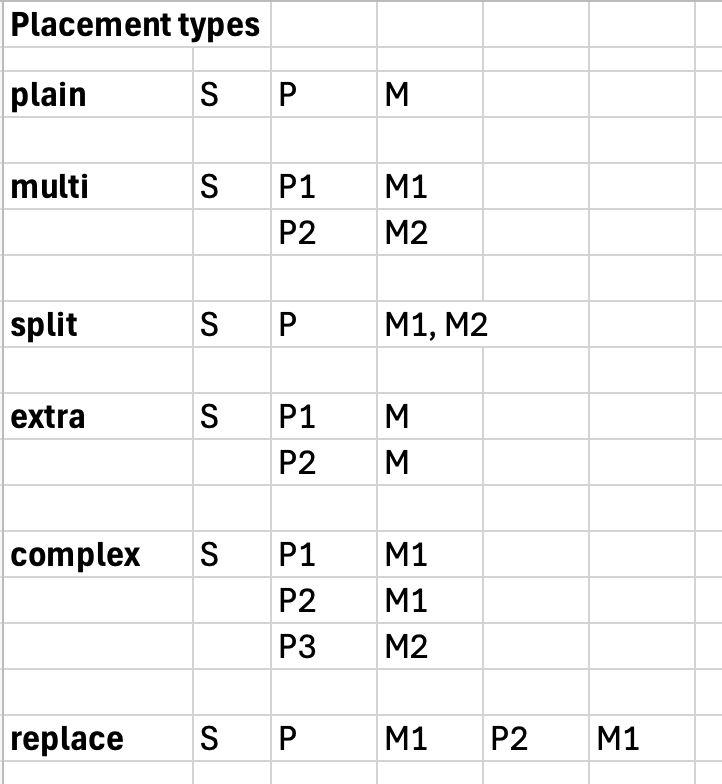
A student may be on a single placement a year for one module only. This is the simplest case to programe and manage. [plain]
They may have more than one placment in a year, each attached to one module. [multi]
They may have a placmement that is attached to two modules, and so the task need to be assigned to the module and the placement. [split]
They may do an additional (short) placment for one module. [extra]
THe case may be that there are combinations of number of placements and whether one or more has more than one mudule attached. [complex]
They may change placment during the year which then remains linked to the same module(s) as the one it replaces. [replace]
There may be tasks which are floating to the module, and so may be completed on any placement associated with that module. [float]
There may be tasks which are floating to the placement, and also floating to either module. [free]
This implies that until a StudentTask has been assigned a module, it is available to all, or all in the same placement, but then after that is becomes fixed for the purpose of marking.

The assemblage of StudentTask records allow for those to be marked and entered into the related ARLT record, which imolies that whether this was completed in a single placement or multiple, these records can be filtered down to just those linked to a specific module.

Because all supervisors and some markers will be using the web front-end, it is desirable to not have to download local copies of files to see their content, and that linked video should be shown in new browser window.

portfolio

v1.0.8

· 3 perc olvasás
John Renfrew
Programmer and data architect

Version 1.0.8 internal test release

  • Decision - this is all going to be available at portal.moorlands.ac.uk and docs.moorlands.ac.uk
  • After initial demos, we are adding translation to this site, so that MCEE students and supervisors can have documentation in Czech (Čeština)
  • Base structure creaated for forms, discussion about language below

Alternate language content may be reached from the drop-down top right of the site, with Cestina being the only choice. Notes about this are added to appropriate pages. Translation is done using Amazon Translate from AWS, and we need a mechanism for proof-reading and corrections where appropriate.

The two things a student has to complete during a placement are records of time with activity, and a series of questions that require a typed answer. The first of these will be referred to as Time Records. The second will be called Task Entries. The entry may be a text input, but also any other appropriate control (like a tickbox or radio set, or scale or priority ordering) There may be requirement for additional doument uploads, and the precise nature of these is currently being discussed.

The 'task entries' are a collection of questions created in surveyjs with the describing JSON being saved on a FileMaker record (through the _portfolio file). Each question may have read-only and visibility criteria added, based on data that is added to the student's saved data, modifying the form behaviour. At the 'top' are questions visible and editable by students. Next are questions only visible to supervisors, while the student answers become read-only. After that are questions for markers with all the above noiw read-only. And finally external examiners may have their own question to confirm they have reviewed the record, with all other answers read-only.

The questions are then gathered in a set or bundle that may be common to one or more module placements. They are marked with year(s) for which they are considered active. These template-bundles are then used to create a module-specific template for a specific academic year. The module-specific template may consist of one or more template-bundles and also individual tasks. At this point each of the tasks now in the module-specific template is assigned group visibility (so a task may only be visible to a supervisor or marker, in addition to the behaviour within the task outlined above). Dealine dates are added for each of the (currently 3) centres.

A student placement will be linked to one of these module/year-specific templates, and a scripted process will add an individualised copy of each of the template records (StudentTasks), using the appropriate deadline data based on the Study Centre in Sopley Central and the JSON object which defines the specific questions in the task. These will be first ordered by deadline date before creation, so that the filemaker view will naturally sort to this order. These are the individual endpoints where student/ supervisor/ marker responses will be held, and from where they can be pulled to re-hydrate any tasks.

The relationship graph to enable this currently looks like this in _dev

portfolio